设置类页面组成范例
该文章以 EditWorkOrderPage.xaml 为例。
整体预览图
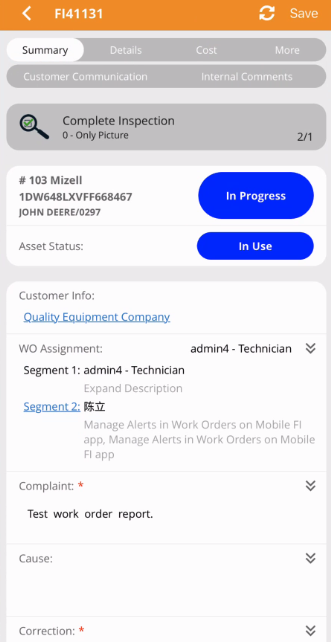
结构
页面继承于 BasePage
<c:BasePage ...
            xmlns:c="clr-namespace:Fleet.Mobile.Containers"
            ...
            Style="{StaticResource LightGrayVisualElement}">
    ...
</c:BasePage>
若正文为选项配置内容,请保持 Style 统一为上述设置样式。
设置项容器结构
<VerticalStackLayout Style="{StaticResource SettingsLayout}">
    <!-- 第一个设置组 -->
    <Border Style="{StaticResource SettingsGroup}">
        <VerticalStackLayout Style="{StaticResource GroupLayout}">
            ...
        </VerticalStackLayout>
    </Border>
    <!-- 第二个设置组 -->
    <VerticalStackLayout>
        <!-- 分组标题,非必须 -->
        <Label Style="{StaticResource SettingsTitle}" Text="Detail"/>
        <Border Style="{StaticResource SettingsGroup}">
            <VerticalStackLayout Style="{StaticResource GroupLayout}">
                ...
            </VerticalStackLayout>
        </Border>
    </VerticalStackLayout>
</VerticalStackLayout>
设置项的样式请保持上述统一样式。
设置项类型
开关类型
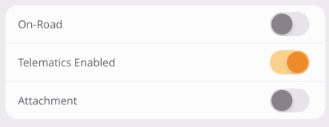
<c:SwitchSettingsView Title="{m:Text FLT_XXXXXX, Default='On-Road'}"
                      IsToggled="{Binding IsOnRoad}"
                      IsEnabled="{Binding IsEditable}">
开关类型设置项只有横向一种布局。
输入类型
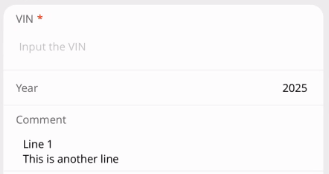
<c:EntrySettingsView Title="VIN" IsRequired="True" Placeholder="Input the VIN"/>
<c:EntrySettingsView Title="Year" Keyboard="Numeric" Text="2025"
IsHorizontalLayout="True"
HorizontalTextAlignment="End"/>
<c:EditorSettingsView Title="Comment" Text="Line 1
This is another line"/>
除了开关类型的设置项,其他设置项均支持横竖向布局切换,默认为竖向布局,通过 IsHorizontalLayout 控制是否为横向布局,注意搭配 HorizontalTextAlignment 来保持文本对齐。
选择类型
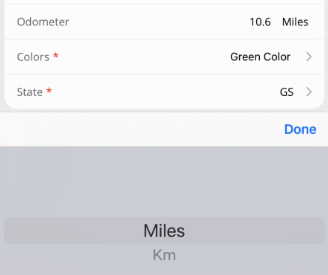
<c:EntryPickerSettingsView Title="Odometer" Keyboard="Numeric"
                           Text="10.6" SelectedItem="Miles"
                           ItemsSource="{Binding OdometerUnitsSource}"
                           IsHorizontalLayout="True"
                           HorizontalTextAlignment="End"/>
<c:DropdownSettingsView Title="Colors" IsRequired="True" IsAll="True"
                        ItemsSource="{Binding DropSource}"
                        SelectedItem="{Binding SelectedItem}"
                        ItemSelected="DropdownSettingsView_ItemSelected"
                        IsHorizontalLayout="True"
                        HorizontalTextAlignment="End"/>
<c:EntryDropdownSettingsView Title="State" IsRequired="True"
                             Text="GS" ItemsSource="{Binding TypeSource}"
                             IsHorizontalLayout="True"
                             HorizontalTextAlignment="End"/>
async void DropdownSettingsView_ItemSelected(object sender, DropdownItemEventArgs e)
{
    if (e.SelectedItem is SettingItem item)
    {
        await App.ShowAlertAsync($"Selected item: {item.Text}");
    }
}
上述三种设置项分别为
EntryPickerSettingsView(可输入选择类型),一般用于带单位的属性项设置。DropdownSettingsView(弹出列表类型),一般用于固定列表的选择项设置。EntryDropdownSettingsView(可输入弹出列表类型),一般用于非固定列表,可任意输入字符串的属性项设置。
日期类型

<c:DatePickerSettingsView Title="Create Date" Placeholder="Select a date"
                          Date="{Binding SelectedDate}"
                          IsHorizontalLayout="True"
                          DateSelected="DatePickerSettingsView_DateSelected"/>
void DatePickerSettingsView_DateSelected(object sender, DateChangedEventArgs e)
{
    App.Debug($"Pick date: from ({e.OldDate}) to ({e.NewDate})");
}
日期选择设置项的绑定属性和事件触发如上。
自定义类型
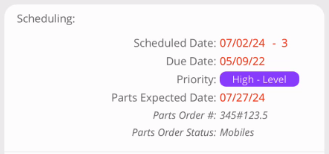
<c:SettingsView Title="{m:Text FLT_XXXXXXXX, Default='Scheduling:'}"
                ControlTemplate="{Binding IsHorizontalLayout, Source={RelativeSource Self}, Converter={StaticResource SettingsTemplateConverter}}">
    <Grid ... Style="{StaticResource SettingGrid}">
        ...
    </Grid>
</c:SettingsView>
SettingsTemplateConverter为公共设置项模板选择转换器。SettingGrid为公共设置项内容 Grid 样式。
以上资源无需自行添加。
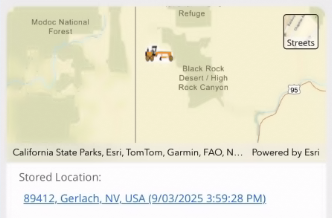
<Grid HeightRequest="200" Padding="0" Style="{StaticResource SettingGrid}">
    <esri:MapView .../>
</Grid>
<c:SettingsView Title="{m:Text FLT_XXXXXXXX, Default='Stored Location:'}"
                ControlTemplate="{Binding IsHorizontalLayout, Source={RelativeSource Self}, Converter={StaticResource SettingsTemplateConverter}}">
    <Label Text="..." Margin="6,4" LineBreakMode="WordWrap"
           TextDecorations="Underline" TextColor="{StaticResource Link}">
</c:SettingsView>
Link 颜色资源为公共资源,无需自行添加。